This procedure explains how to configure searches for sanctions, PEPs and negative press
How to set up screening? #
You can access the screening settings in two ways:
- Through the client register, by entering the relevant file and going to the "Client/proxy/beneficiary identification" tab. The "Search configuration" tab is then available at the bottom of the window.
- Via the persons register by clicking on the relevant person.
How to set up screening against PEP and Sanctions lists? #
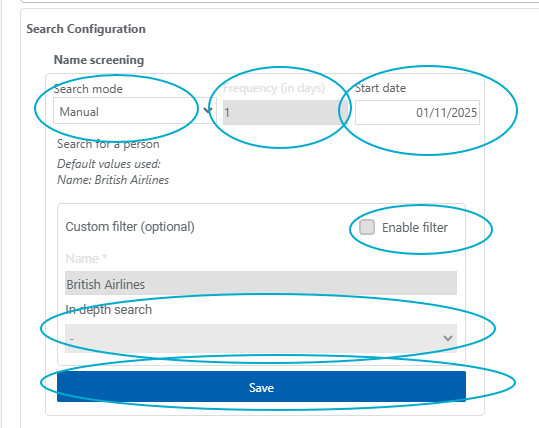
1. Click on search configuration and go to the first quadrant named Name screening«
2. Select your desired search mode: manual or automatic.
In case of automatic screening, choose the frequency in days – for example, 1 day for a daily screening, 7 days for a weekly screening, etc. — as well as the screening start date.
Attention: If you select today's date as the start date, the screening will not be performed automatically, as it is launched at 5 AM. You will therefore have to trigger it manually for the current day.
3. Click «save»
Note: You can also enable the custom filter if you want to perform fuzzy searches.
This will allow you to opt for a fuzzy search with a distance of 1 Or 2, which means one or two characters can differ in the searched name.
How to configure adverse media screening? #
1. Click on Search Configuration and navigate to the second quadrant named «Adverse Media.»
2. Select your desired search mode: manual or automatic.
If you are setting up automatic screening, please select the desired frequency and the start date for the screening.
Attention: If you select today's date as the start date, the screening will not be performed automatically, as it is launched at 5 AM. You will therefore have to trigger it manually for the current day.
3. Click «save»
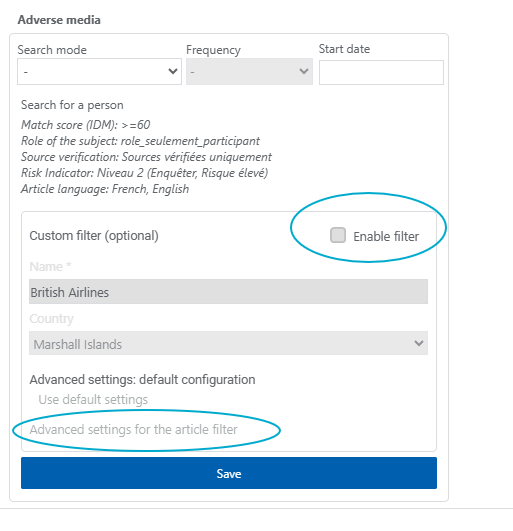
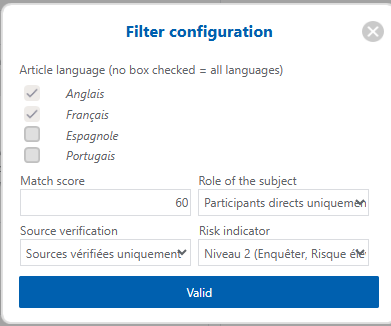
Note: You can also activate the custom filter if you wish to alter the default search settings. All you need to do is click on «enable filter» and then on «advanced settings for the article filter».
You can thus modify the following settings:
1. Article language
2. IDM Match Score (between 60 and 100)
The IDM is a matching score used to assess the level of similarity between the information provided during a search and the information mentioned in the press article regarding the entity being searched for.
This score is based on a correlation between the information entered in the search and the elements included in the article concerning the person or entity in question.
The objective of IDM is to reduce false positives by distinguishing the most relevant results from more uncertain ones.
At this stage, only articles with a score higher than 60 % have been included in the results.
A score of less than 60 % means that the article is not relevant
A score between 60% and 79 % indicates a possible or weak match. These results should be analysed with caution to confirm whether the article actually relates to the person or entity being searched for.
A score of 80 or above on the % scale indicates a strong match. In this case, there is a higher level of confidence that the article does indeed relate to the person or entity being searched for.
3. Role of the subject (Direct or indirect participant)
4. Source verification (Sources verified or not)
5. Risk indicator (No risk, investigate, or high risk)
The «high risk» status indicates a high level of risk. It applies when the level of correspondence is strong, the person is directly involved in the alleged facts, and the source is verified.
The «investigate» status means that the finding requires further analysis. It applies when the person is directly involved in the events, but the connection is only possible or the source has not been verified. It may also apply when the person is involved in the events without being considered a direct participant.
The “No Risk” status means that the person is merely mentioned in the article, without being involved in any wrongdoing. This status therefore indicates that the article does not appear to pose a direct risk to the person or entity in question.