
Table of Contents
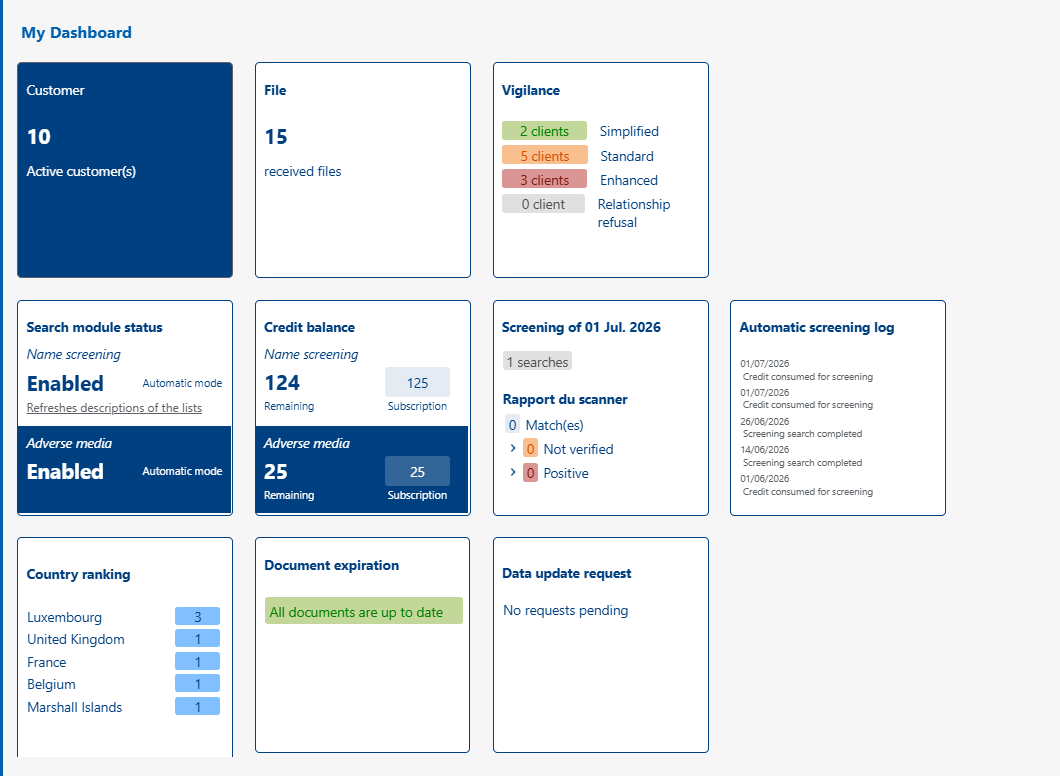
Upon logging in, the user is redirected to the general dashboard. This is purely for indicative purposes: it allows for a quick overview of the overall status of the KYC database, without replacing the detailed tabs.
Information available (in display order) #
- Line 1:
- The number of customers entered into the application.
- The number of files received.
- The distribution of clients by vigilance level: simplified, standard, or enhanced.
- Line 2:
- Confirmation that the screening module is active. A distinction is made between classic screening (PEP/Sanctions) and adverse media
- The number of remaining screening credits. A distinction is made between classic screening (PEP/Sanctions) and adverse media
- The results of the last screening carried out, detailed in the «Hits Verification» tab.
- The journal indicating the history of automatic searches
- Line 3:
- Customer rankings by country.
- A summary of expired or expiring documents, detailed in the «Document Expiration» tab
- Requests for data updates received from your clients (only if the customer communication module is activated in your database)
Good to know #
The dashboard indicators are intended to guide the user towards the files or actions to be processed. To take concrete action, you must then open the relevant tab or file.